If ordinary paragraphs are hard to read, read like this
Flitread was built as a speed reader. But the way it works turns out to matter for something else entirely: it shows your text huge, one phrase at a time, in the same place on screen. There is no line to track across a page, no small dense print to fight, and nowhere to lose your place. Quite a few people who find ordinary reading tiring tell us that is simply easier, full stop, speed aside.
If that’s you, this page is for you. And to be clear up front about what this is: a reading app with one specific way of displaying text. It is not a treatment, a therapy, or a medical device, and nothing below should be read as a diagnosis or a promise. It’s a mechanic you can try in a minute and judge for yourself.
Why dense paragraphs are tiring
Normal reading asks a lot of your eyes. Find the start of the line. Hop across it in small jumps without overshooting. Find the next line down without dropping back onto the one you just read. Repeat for hundreds of lines of small text. That tracking work is constant, and when it fails, you re-read the same sentence three times or drift to a line you already covered.
Some people find that work much harder than others, for many different reasons. Difficulties vary from person to person, and they go by many names: dyslexia, low vision, an attention style that won’t sit still, or eyes that are simply exhausted at the end of a long day. We won’t diagnose anyone and we won’t promise to fix anything. We can describe exactly what the app does and let you decide whether it fits.
What one big phrase at a time changes
No line to track
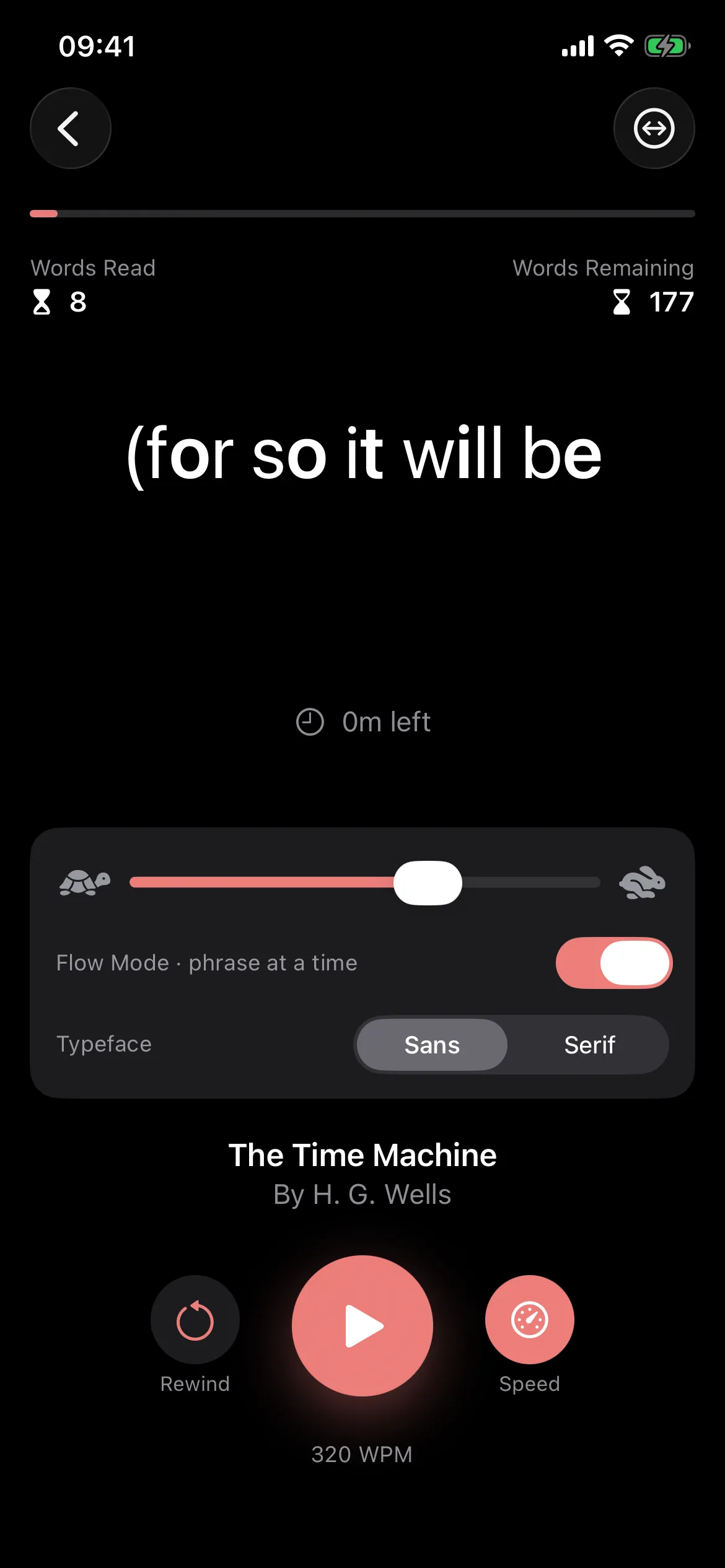
Text appears large and centered, in the same place every time. Your eyes stop hunting for the start of the next line, because there isn’t one. The phrase you’re reading is the only text on screen.
No wall of text
One phrase at a time means there is never a dense page waiting to discourage you, and never a paragraph whose length you can see coming. Reading arrives in pieces sized for people, not printers.
Nowhere to get lost
You can’t skip a line or drop onto the same one twice. Look away, and pause is a tap; playback resumes gently rather than jolting. Rewind is one tap, and every book reopens exactly where you stopped.
Your pace, your type, your size
Set the speed per book, from very slow to very fast, with a live words-per-minute readout. Choose serif or sans typefaces. The text scales with the larger accessibility text sizes on your iPhone, so it grows to match the size you already use everywhere else.
Demo text, the opening of Alice’s Adventures in Wonderland: Alice was beginning to get very tired of sitting by her sister on the bank, and of having nothing to do: once or twice she had peeped into the book her sister was reading, but it had no pictures or conversations in it, "and what is the use of a book," thought Alice, "without pictures or conversations?" So she was considering in her own mind (as well as she could, for the hot day made her feel very sleepy and stupid), whether the pleasure of making a daisy-chain would be worth the trouble of getting up and picking the daisies, when suddenly a White Rabbit with pink eyes ran close by her. There was nothing so very remarkable in that; nor did Alice think it so very much out of the way to hear the Rabbit say to itself, "Oh dear! Oh dear! I shall be late!" But when the Rabbit actually took a watch out of its waistcoat-pocket, and looked at it, and then hurried on, Alice started to her feet, for it flashed across her mind that she had never before seen a rabbit with either a waistcoat-pocket, or a watch to take out of it, and burning with curiosity, she ran across the field after it, and fortunately was just in time to see it pop down a large rabbit-hole under the hedge. In another moment down went Alice after it, never once considering how in the world she was to get out again. The rabbit-hole went straight on like a tunnel for some way, and then dipped suddenly down, so suddenly that Alice had not a moment to think about stopping herself before she found herself falling down a very deep well. Either the well was very deep, or she fell very slowly, for she had plenty of time as she went down to look about her.
Try it here: this is the whole mechanic. On iPhone it works with your actual books, slow and steady if that suits you.
Who finds this useful
Different people, different reasons, and all of them their own words rather than our claims:
- Readers with dyslexia tell us the single big phrase removes the tracking work that makes dense paragraphs tiring: nothing to lose, nothing to re-find.
- Readers with low vision get one large phrase on screen, with text that scales up alongside the accessibility text sizes their iPhone already uses.
- Distractible readers (many say ADHD) get one thing to attend to, moving at a pace they chose, so the display does the holding-in-place for them.
- Tired eyes get text the phone holds steady in one spot at the end of a long day, instead of small print to squint across a page.
None of that is a medical claim, and Flitread wasn’t designed with clinicians or certified by any accessibility organization. It’s a $3.99 reading app with one honest mechanic. You’ll know within a minute whether it helps you, and that’s the only endorsement that counts.
What it doesn’t claim
To be plain: Flitread is not a treatment for dyslexia, not a vision aid, and not a substitute for the tools that already work for you. Screen readers like VoiceOver, magnification, and high-contrast modes are essential tools, and Flitread is a visual reading app that doesn’t replace them.
What it is: big text, one phrase at a time, in one place. Some people find that easier to read than ordinary paragraphs. You can be the judge of your own eyes.
Reading comfort, feature by feature
- Huge text that scales with iPhone accessibility text sizes
- Serif or sans reading typefaces
- One phrase at a time (Flow Mode), or fixed word windows if you prefer
- Per-book speed, from very slow to very fast
- Live words-per-minute readout
- Tap to pause; playback resumes gently; rewind is one tap
- Chapter navigation and exact position, saved automatically
- Fully offline: your library never leaves your phone
- No account, no ads; $3.99 once
- EPUB, PDF, DOCX, HTML, TXT, pasted text, URLs, and anything shared from Safari
And if speed is the part you’re curious about, Flitread is also a genuine way to read faster and stay focused. Same mechanic, other benefit.
Comfortable reading, honestly answered
Is Flitread an accessibility app?
It wasn’t built as one; it’s a speed reader whose display happens to be genuinely comfortable for some readers: big text, one phrase at a time, nothing else on screen, no line to track. We describe exactly what it does and leave the judgment to you. There is no accessibility certification behind it and we won’t pretend otherwise.
Is this a reading app for dyslexia?
It’s a reading app that some readers with dyslexia find easier, because the text is huge and there’s never a dense paragraph or a line to lose. Dyslexia is different for everyone, Flitread is not a treatment or a therapy, and we don’t claim it fixes anything. If big single-phrase text sounds like it might suit you, try it and see.
Does it work for low vision?
The reading display is one large phrase at a time, and the text scales with the bigger accessibility text sizes on your iPhone. Serif or sans typefaces are your choice. If text that large still isn’t comfortable for you, a screen reader such as VoiceOver will serve you better than any visual reading app, ours included.
I have ADHD. Will it hold my attention?
We can only describe the mechanic: one phrase on screen, moving at a pace you chose in advance, with nothing else to look at. Many self-described distractible readers tell us that keeps them anchored while ordinary paragraphs let their mind wander. That’s their experience, not a medical claim.
Can I make the text really big?
Yes. The reading display is large by default (40pt and up) and scales with your iPhone’s accessibility text sizes, so it grows with the text size you already use system-wide. You can also slow the pace down as much as you like, per book, and pause with a tap.
What can I read with it?
EPUB books, PDFs, Word documents, HTML and plain text, anything you paste, readable articles from a URL, or anything you share to Flitread from Safari or another app. Kindle files are DRM-locked by Amazon and can’t be imported. iPhone, iOS 17 or later, a one-time $3.99 purchase: no subscription, no account.
Reading that comes to you.
Flitread for iPhone: big text, one phrase at a time, no line to lose. $3.99 once.
$3.99 once · No subscription · No ads · iOS 17+